
Change Right-Click Options with FileMenu Tools

Windows reacts in a predefined way if you right-click a folder, file or blank space. The right-click menu offers all kinds of actions such as Open, Delete, Add to archive and Send to which is often very convenient but sometimes also overwhelming.
You can use it for example to open a file with a different program, look at file properties or perform other actions based on the selections provided there.
Sometimes though it may seem that commands are missing from the context menu while it looks packed with options at other times that you may never user in your entire computing career.
The freeware FileMenu Tools provides you with options to add new features to the Windows Explorer context menu and to remove existing options from it.
FileMenu Tools
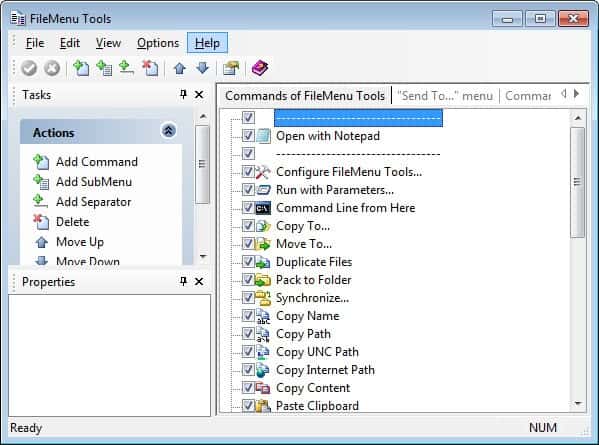
You are free to create new folders, sub menus and separators and fill them with the content that FileMenu Tools offers. It divides available features into three tabs at the top: Commands, Send To and other applications.
The commands tab lists more than two dozen tabs that include options to create symbolic links, display the size of folders, shred files or use find and replace. What may be interesting is the option to run any program with parameters or the command line from the location the option is invoked from.
The usefulness of those options depend on what you are using your computer for.
The Send To menu display existing Sent To entries which you can enable or disable there. So, remove any item that you do not want listed in the Send To menu which is mostly helpful if you use the menu frequently but never use some of the options listed by it.
What may be even more interesting is the third tab the program makes available. Here you can remove entries that other programs have already placed in Windows Explorer menus, usually during installation.
Just uncheck the options that you do not want listed in the context menu of Windows Explorer to remove entries from it. This can be very useful if you have many entries in the menu that you are never using.
The program allows you to remove all the options from the right-click menu that you will never use to streamline it and put the focus on actions that you do work with instead.
Since the right-click menu is context sensitive, you find different types of files or folders listed there so that you can configure the menu for each item individually.
Among the options are drives, all file types, directories and folders, shortcuts, printers, and even the Recycle Bin.
Simple uncheck any option you don't require and it is removed from the context menu. Please note that you may need to restart the PC before the changes take effect.
Verdict
FileMenu Tools is a useful program to edit the right-click context menus that Windows Explorer displays on the system. It is compatible with all recent versions of the Windows operating system and available as a portable version and installer.





















Software appears to be pictured with a Windows XP-style UI, but does not work at all on Windows XP, current and older versions.
WARNING DO NOT DOWNLOAD THIS it has the virus Trojan:Win32/Spursint.A!cl
Where’s the download link for ‘Edit the Send To menu’ ?!