
Drop my Rights: run programs with limited rights on Windows

Drop My Rights is a free program for Windows XP and Windows Server 2003 to run programs with lowered rights.
Most users who work with Windows XP in a home environment use the administrators account which is probably the easiest but also the least secure way of working with Windows XP.
A better solution is to create a limited user account and use it as the primary account instead. This is disliked by many users as it limits what can be done directly on the operating system as some actions require administrative privileges.
So, it is easier to use the administrative account right away but also less secure, as malware has the same rights as the account it is started from.
Instead of using a limited account, one can also run software that gives limited access rights which in turn limits malware to those rights so that the system is better protected against attacks targeting those programs.
Drop My Rights
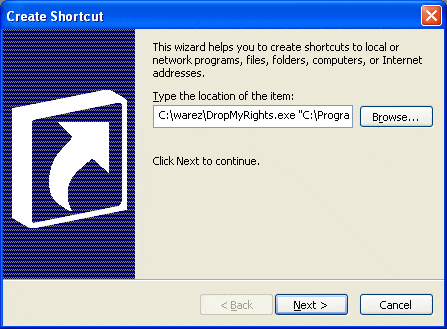
A script that you can use for that task is Drop my Rights. It has been developed by Michael Howard for Microsoft.
The software is command line driven but you can easily create shortcuts to the programs that you want to run with reduced privileges. The most likely candidate for this is of course the web browser that you are using, especially Internet Explorer, but also other programs with Internet access such as P2P software, email clients or messengers.
To create a shortcut to a program on your computer do the following:
- Create a shortcut for the program and right-click it afterwards.
- Select Properties from the menu and click on the shortcut tab if it is not the active tab already.
- The target entry contains the link to the application that is started when you double-click the shortcut.
- All that needs to be done now is to add the link to the drop my rights executable before that initial entry and add the privilege level behind that entry. Let me explain it with an example: "C:\dropmyrights.exe" "c:\something.exe" C
Privilege levels can be N for normal users, C for Constrained users and U for untrusted users. Please note that many programs do not work if you run them as an untrusted user and that some applications do not work for constrained users.
Update: Drop My Rights is no longer available on its original website. We have uploaded the latest release version of the program to our download server. Note that we don't support the program in any form. Download the program with a click on the following link: (Download Removed)
Securityfocus conducted a series of tests to show the differences between constrained and normal users and I took the liberty to quote the important results.
Administrator:
During the testing a number of unrecognized applications were installed. Changes were made to the GUI of Internet Explorer including the addition of various buttons and search-bars. Phantom windows would appear and disappear at random, and there were numerous popups. The virtual machine itself was running noticeably slower as well. Although an online virus scan was initiated, it didn't complete successfully. In fact the scan died with an error before it actually completed. It found 7 infections, however, before it finally died.
Normal User:
The only observation of note during the experiment is that pop-ups still occurred. There were no phantom windows or unexplained applications installed. However the virus scan still turned up 4 viruses. Since the author recommends the "C" parameter while surfing more questionable sites, the next portion of the experiment did exactly that.
Constrained User:
During this final experiment the only oddity observed was that the Internet Explorer window would maximize if it wasn't already. There were no pop-ups, pop-unders, or any of the other effects previously observed, and this time the virus scan turned up zero viruses.
All tests were performed using Internet Explorer to visit unfriendly sites. It should be noted that this does not mean that you are 100% secure if you run your programs with constrained users privileges but it adds to the security and this is what really counts.
Tips
- You can download a couple of shortcuts on the site linked above to get started right away.
- Note that Drop My Rights appears to be only compatible with Windows XP and not newer versions of Windows. I suggest you use the excellent PsExec by Sysinternals instead on newer systems.


















you can add the action to a right click context menu
that would be very convenient.
http://www.extremetech.com/article2/0,1697,1838907,00.asp