
Copy songs from and to your ipod without itunes

I do love my iPod Nano. I carry it around all the time and listen to music when I go to work or visit friends. Sometimes I have some nice new tunes on my iPod and would love to copy them to a friend's computer (or a secondary computer that I own, notebook for instance). My friend has to install iTunes or a similar software that can recognize the songs on the iPod and copy them from the device.
I always thought that there had to be a better way to share songs (note to RIAA: my own created music, nothing you have to worry about). When you connect the iPod to the computer it will not show the songs, it will only show notes, calendar and contacts. (could differ from iPod to iPod though).
Sharepod is the tool I was looking for as it allows me to transfer songs from my iPod to a computer, and vice verse. Instead of installing the freeware to a computer you copy it to the iPod and run it from there which also means that you have always with you when you need it.
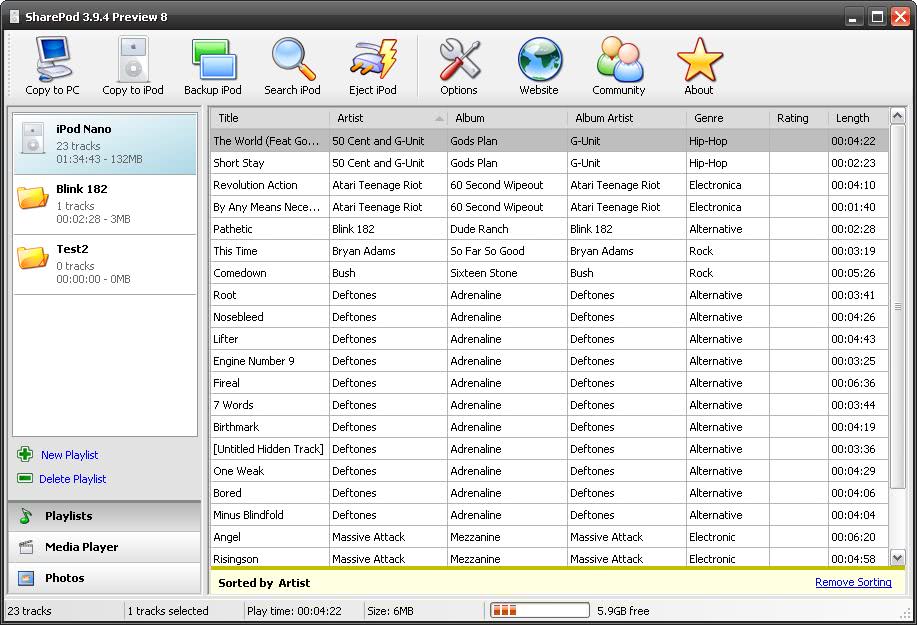
All you need to do is copy the contents of Sharepod to your iPod when it is connected to your computer. When you connect the iPod to another computer you simply execute the Sharepod executable and it should load just fine. Some common files are needed on the windows computer which should normally be there. The author links to them from his site if they are missing.
Once open you can copy music from and to the iPod. Please note that you should turn of auto-sync in iTunes if you want to run that software on your own computer and add files from your friend's systems to the iPod. If you do not turn it off it will delete all files that have not been added using iTunes.
Tips
- You can create playlists from songs found on your iPod so that you can listen to songs found on the iPod from any computer that supports Winamp Playlists.
Update: The Sharepod website returns an error currently. You can download the latest working version of the application from Softpedia instead.
Advertisement



















good way.i like it.
Hey, many thanks man. This is what I need.
Big Thanks Man, also to SharePod’s author! F*ck iTuna, long live free software!
Checkout winamp –
http://shahjapan.blogspot.com/2009/07/i-hate-itunes.html
Its great way to manage your ipod nano /shuffle…..
Thnx dude…. Excellent Software. U made my work so easy and without any hassle of itunes !!!!! Keep it up dude !!
this looks like a great software. do they make this for mac? i’ve tried a few similar ones for mac, but they all ended up crashing upon opening (namely ImTOO and Xillisoft iPod Rip for Mac, which are basically the same program under different names. They even made my OS crash and i had to restart my computer – VERY frustrating!)
Hey thanks! I was looking for something like this!
PodPlayer has been around and doing this for awhile. But unlike SharePod PodPlayer also can plays any of the music files on the ipod itsself or you can use an external player.