
How to reduce the fan speed of the Nvidia Geforce 6600 GT

The following tweak may actually work for most NVIDIA and AMD video cards, and not only the NVIDIA GeForce 6600 GT card that I'm using to demonstrate it. The default fan of the video card is really loud that it irritates me even if I'm working on the desktop and not playing games that may tax it to the maximum.
The first thing I tried was to find updates for the driver software and then firmware upgrades for the card to see if they would resolve the issue and lower down the fan rotation so that it would not be as loud anymore.
MSI, the maker of the card, did not offer any firmware upgrades and the latest Nvidia drivers did not resolve the issue as well. I though that I was left with replacing the card's default fan with a slower spinning one, or replacing the card instead. I did not really like both options though as they meant that I had to spend money to correct the issue.
I made the decision to search for a solution on the Internet. What I noticed was that I was not the only owner of the card who had issues with the card's noise generation.
One suggestion was to use theRivaTuner freeware to reduce the fan speed of the video card to lower the noise that it generated. This was the solution I was looking for and I quickly downloaded and installed Rivatuner to give it a try. The only thing left was to lower the fan speed and make the changes permanent.
I clicked on customize in the first screen that appeared right next to Forceware detected and selected the icon for system settings from the panel. The second tab was named fan, the goal of my search. It allowed me to set a new fan speed value for three different states: standard 2D, low power 3D and performance 3D. I changed the settings from 100% to 25 in standard 2D mode, 50% for low power 3D and 100% for performance 3D. 2D means everything that you do normally in Windows like using office, browsing on the internet or writing emails.
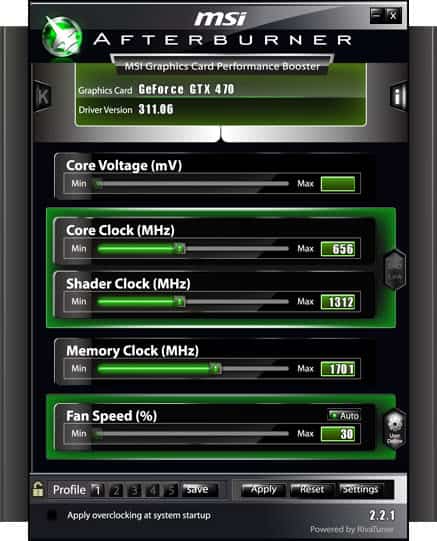
I checked the box that saved the settings so that they would be applied during every system start and voila - the noise was gone. From one second to the next it was gone. My PC is almost silent now, the noisiest part is my external hard drive, everything else is barely audible (I bought a low noise cpu fan and power supply).
I suggest you take a look at Rivatuner if you face a similar problem like I did. It might solve yours too.
Update: Rivatuner has not been updated since 2009. A program that you can use instead is MSI Afterburner which uses the program's core to make available its functionality. It is compatible with all recent AMD and NVIDIA cards, not only those manufactured by MSI.
Advertisement













I installed rivatuner on my (recently upgraged to) Vista PC. It would not let me alter the settings for 2D and low power 3d. also, vista kept blocking the program at startup. i thought i was so close to the answers… but no.
The 6600 only started running non stop after i upgraded to vista…
I wish the same thing would work on that power supply. Eveything in this house have power supply and not one of them use a fan. Why use a fan in the PC. I may just take that fan out and see what happen.
Hi, Awesome fix. I had this exact problem with my 6600, and these settings make the PC totally silent now. Thanks alot for posting this.
Hi,
Mine fan is going very slow, too slow. In rivatuner it is at 100% is there a way i can speed it up?
Thanks
Brilliant. Thanks muchly for posting this. I was completely ready to hurl my video card out the window, and the drive my car over it several times for good measure. It was easily that annoying. But RivaTuner is the business, and after a little adjusting I can barely hear my card in 2D mode. A hat tip to you sir.
I have a Geforce 6800 GS. A couple of games especially Call of Duty 2 was was studdering with around 15 fps. I tried everything until I came over Rivatuner. I installed it and voila, the game runs at 91 fps! But the thing is, after installing Rivatuner my cpu sometimes goes up to 100% usage. Ive checked taskmanager and its like all processes has gone mad jumping up and down from 0 to 100% cpu usage. If I lower the fanspeed in cpu usage goes down again. What could be the cause of this?
Hey, I have a GF6800LE card, which I’m able to adjust in the way mentioned above. Does anyone know of a similar utility for Linux? Only one I was able to find is nvclock (version 0.8b2), but it claims my card doesn’t support fanspeed adjustment even if I use the -f switch.
Tobey the most important thing is that you are satisfied with your card. I’m happy with mine now, too. It was to loud before but now it is a pleasure to work at my computer.
Would advise everyone to do the same if you feel that your card is to noisy. Everything is working as usual which means no cold reboots, the card is not to hot.
Perfect solution.
Didn’t read this topic but I’ve got ASUS EN7300GT silencer and I’m absolutely satisfied. Well, maybe it’s not gamers card but it’s great for normal work and also new games.