
The Wonderful Icon Freeware

Oh well, the name wonderful icon is not really helping when you try to figure out what this freeware does. The main purpose is to assign new hotkeys in Windows. The program offers you a great deal of predefined actions that can be assigned to hotkeys, for instance: Open Browser or a Dos Box, set a window to be Always on Top, Type Char xyz into the active window, reboot and many more. I would say there are around 100+ predefined actions and you also have the ability to create new ones very easily.
You have two options when you are creating a new action. The first one is two define one or two actions that you want invoked once you press the hotkey. The second uses the "if the current window" statement to define actions that will only be executed if the active window is in the selected state.
You can create shortcuts that open a program and then make it stay always on top. It is also possible to combine both options.
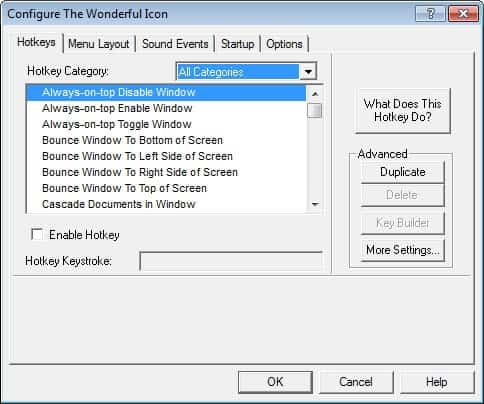
The Wonderful Icon adds an icon to the system tray which offers something different as well. Clicking the icon gives you the ability to logoff or reboot for instance. You can define new entries to that menu easily as well using the same technique that the shortcuts offer.
Update: The Windows program has not been updated for a while, but it appears to be still working even in newer versions of the Microsoft operating system. First thing that you may want to do after starting the program for the first time is to enable hotkeys in the configuration window. It may take a while to go through all of the hotkeys to find the ones that you may find useful. Here is a short selection of actions that you may want to map to hotkeys.
- Toggle Mute on/off
- Load Program
- Hide /Un-hide desktop icons
- Shutdown
An online help is available that explains the functionality of each action.
Tips
- You can configure a hotkey to paste an ASCII character on the screen. You can use it to type characters that your keyboard does not display.
- The program supports a save and restore clipboard shortcut. The save command takes what is in Clipboard currently and saves it, the restore command adds previously saved text back to it.
- You can configure the program to auto-cycle through sound effects. Instead of listening to the default beep for example, you can configure it to go through a list of sounds in a folder you select.



















