
Change your bookmarks toolbar appearance in Firefox

I have more bookmarks in the bookmarks toolbar than Firefox is able to display which leads to the unfortunate situation that the last ones are not shown in the toolbar anymore. While it is still possible to access the bookmarks using left and right arrows once, it is not an ideal situation and needed to be fixed.
The first thing that came to mind was to change the text of the bookmarks so that they would not take up that much space on the toolbar anymore. The idea made sense but you will eventually run into issues again as space is limited on the bookmarks toolbar.
I knew that Firefox was highly customizable and I began searching for a way to alter the style of the bookmarks toolbar and quickly found it. Now, to change the style, which includes reducing or increasing font sizes, changing the font type, changing colors on that font and much more you need to open userchrome.css which should be in your Firefox profile folder.
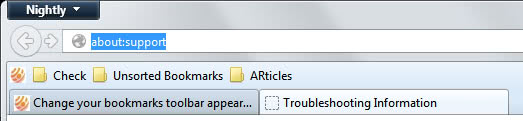
To find your Firefox profile folder enter about:support into the Firefox address bar and click on the show folder link on the page that opens up.
Paste the following line of code at the end of this file:
.toolbarbutton-text {
font-size: 9px !important;
}
This changes the default font size to 9px which is what I'm currently using. To increase it just increase the value. Some other settings that you can try:
- Change the font color of the bookmarks: font-color: blue !important;
- Change the font itself: font-family: Verdana !important;
- Change the background color - this example changes it to blue. background-color: blue !important;
- Creates a border around the bookmarks. border: 1px solid !important;
Update: Some users have asked me where they can find the Firefox profile folder. The easiest way to locate it is to click on the Firefox button, and select Help > Troubleshooting Information from the context menu there.
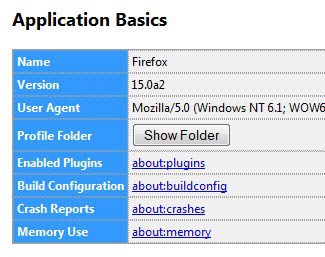
Here you find the profile folder listed under Application Basic. Just click on the button to be taken there directly.
Update: There is another option that you have. Check out our guide on making the most out of Chrome's and Firefox's bookmarks bar. The idea here is to rely solely on icons and no text at all to make use of the space in an optimal fashion.
Another option that you have is to use bookmark folders to sort bookmarks into.
Advertisement

















Thanks a lot! Can you believe how hard it was to find it through Google how to change the (bookmark) toolbar color? As a sidenote for others, something has changed. Instead of “font-color: blue !important;” you need to type “color: blue !important;”. And you can for example enter “color: #d8dcff !important;”
I don’t have a userchrome.css file in my FF profile folder. Any help?
Simply create it.
I found another forum that said that. Thanks, though.
My bookmarks toolbar is light blue. I tried changing the background color per the blog post to green. Now the bookmark toolbar is still light blue, with the text areas of the bookmarks dark green.
Since this was not what I wanted, I tried to get rid of it. I have changed the userchrome.css back to default, but the green does not go away. I have been unable to get rid of it. Help will be greatly appreciated.
Is there a way to change the entire bar color?
Thanks,
Steve
Problem fixed. I read above that the userChrome.css file should be in the profile folder, and I put it there. Apparently Firefox then moved it to the chrome folder, so my additional edits had no effect, since I was still editing the .css file in my profile folder.
Perhaps the text above should be changed. Now it says:
“open userchrome.css which should be in your Firefox profile folder”
change to something like:
“open userchrome.css which should be in the chrome folder under your Firefox profile folder”
Steve
I should have said: I’m in Windows 7 and Firefox 14.0.1
Steve
I have two Firefox Bookmarks Toolbar as is but be two independent of each other as possible. :-k :-k :-k ](*,)
help me
Was just searching for the same thing. And found something better. Your post is old and maybe u have found this already.
Anyway, If u havnt you can enable multi-line bookmark’s toolbar by adding the following code to the css
/* Multi-Row Bookmarks Toolbar */
#bookmarks-ptf {display:block}
#bookmarks-ptf toolbarseparator {display:inline}
I’m an organization freak on my toolbar, and I have eight main folders with different categories: Entertainment, News, Shopping, My Stuff, etc.
Under each (PLAIN AND BORING) folder I have the easy to distinguish icons. I use Favicon Picker 3 to make icons for the rare sites that don’t have their own icons already. It’s very easy to add an icon when one doesn’t exist.
Eventually I believe that Favicon Picker is going to make the folders customizable. I know that this is a complaint a lot of people have. If I could lose the text next to my folders, everything would be MUCH nicer.
Hi,
You speak about little text, but, if the icon is sufficiently comprehensible, you can also empty the text field… This gains a lot of space.
The only problem is for sites that has a standard favicon… A extension to specify a favicon for bookmarks would be great…
Godfrey never heard of that before..
[edit: *have* been unable]
Recently my bookmarks toolbar has completely disappeared and I haven’t been unable to reset or fix it. To be more accurate, the toolbar is there, but blank.
Anyone else had this problem?
I had that when upgrading from FF1.5 to 2.0.
The solution was to completely remove Firefax (with Windows Add/Delete programs) and then reinstall 2.0 from scratch.
This should do no harm to your profile settings but backuping it could be wise tough…
I had the same issue with the toolbar. I erased the text and just used a full row of icons (that is, for the sites that actually *use* icons. Some are still in the dark ages and they have that awful blank white ‘typing paper’ looking thing. Nice way to set themselves apart, eh?).
Like you, I ran out of room and ended up adding actual folders. Soon I ended up with a row of folders for different purposes (business related, mags and newspapers, multimedia, and so forth).
Again I ran into an annoyance: in Firefox, your folders will always look alike. There’s no way to, for example, right click and select a different sort of icon to use as a file folder. Sure, the folders on my toolbar are all *named* differently, but it would be more efficient if each folder had a unique visual appearance to make it faster to find the one you want. Plus, you could do the same thing as mentioned previously re: the bookmarks – erase the actual filename and go by the folder’s unique appearance alone.
Isn’t there a way to somehow change folder appearances in Firefox? Even if there could be a simple color-change option that would help. That kind of ability seems to be a necessary one for those of us who have different files for business use and personal use, as well as files of bookmarks that may belong to another person in the household for instance.
I hope someone can come up with some customization solutions for the folders and bookmarks thing!
Long live gHacks! – Steph
I wish I could have 2 bookmark tool bars. What I am doing now is just not having any text and relying solely on favicons for my bookmarks.
Well, yes that would be an option indeed. Did not know that you could add folders there as well.
I still like to reach everything with one click :P
The easiest way to get more bookmarks on the toolbar is to use Folders. To do that just right click a blank spot on the toolbar (I know that is difficult for you :)and select “New Folder”. After you have a folder or two just drag and drop the individual book marks into the folder(s).