
Change the Windows Thumbnail Preview Size

Well this is just a little Registry hack that changes the size of the thumbnails of images that are displayed in Windows Explorer by default.
The default size is relatively small and most people surely would like a bigger size for the thumbnails to get a better preview of the images. To do that you have to add a new entry called ThumbnailSize to the Windows Registry, let me show you how that is done.
Open the Windows Registry editor with a tap on the Windows key, enter regedit.exe in the search form and hit enter to load it on the system. You may receive an UAC prompt that you need to accept before you can continue.
On newer versions of Windows do the following instead. Use the Windows-R shortcut to bring up the runbox. Type regedit into the box and tap on the enter key afterwards.
Browse to the Registry key HKEY_LOCAL_MACHINE\Software\Microsoft\Windows\CurrentVersion\Explorer.
Right-click on it and select New > Dword (32-bit) Value and name it ThumbnailSize. Double-click the new entry and select decimal and a number between 32 and 256. The default value for the thumbnail size is 100, if you want a bigger size increase the number, if you like smaller ones select one below 100 instead. The new settings will become active after you restart your system or Explorer.
Update: Newer versions of Windows Explorer allow you to change to four different thumbnail sizes, eliminating the need to hack a Registry parameter for this for most users.
On Windows 7, all you need to do is open the Windows Explorer directory that you want to change the thumbnail size for, and click on the thumbnail icon in the lower right of the screen. This opens a context menu where you can switch
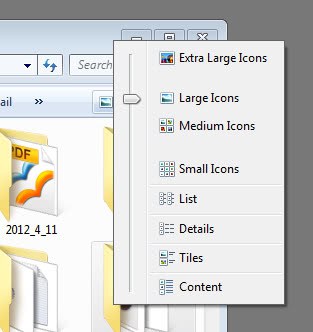
Just select small icons, medium icons, large icons or extra large icons to change the thumbnail size in that Windows Explorer folder. The switch is instant and visible right away on the screen. Remember that Windows saves the display preferences for each folder separately, so that you may need to select a different thumbnail size in multiple folders.
Note: the thumbnail Registry entry does not seem to have any impact on newer versions of Windows because of this.














Lousy advice: manual method does not work in Windows 7, XL thumbnails works only in title field [to left], not in preview field to right, and TweakUI is not available in a Windows 7 version.
Bottom line: you’re stuck with tiny preview images- there is no fix.
Hmm, doesn’t seem to work for me. I tried 255 restarted my system but no difference… And by the way, how big will the images be with 255?
EDIT: Nvm, I managed to miss the b button so it said ThumnailSize. Shall test again.
I prefer to do that by hand, it’s better so you understand what you are doing, where you are doing it and how to reverse it if something unforeseen happens.
Nuthing like reghacking by hand =D
u can do the same thing using windows Microsoft PowerToys – Tweak UI, much easier,
cheers,