
Add PC Wide Keyboard Shortcuts

Keyboard shortcuts make our life easier, hitting Win +M is a lot faster than having to minimize every window by hand. Windows XP already has a method of assigning new keyboard shortcuts to programs but this method is very limited. You are only allowed to assign shortcuts using a combination of at least two Ctrl, ALT and SHIFT keys plus one additional letter, number or symbol.
Clavier is a freeware that extends the capabilities of keyboard shortcuts in windows xp. You are free to use almost any key for the shortcut including the windows key. The interface is pretty straightforward - it displays a list of all current keywords with their shortcuts.
To add a new keyboard shortcut you simply click on the + symbol below the shortcut list and select either a program from the start menu, internet favorites (IE only), a special char, a folder, a text that you want written, a program to launch or display website.
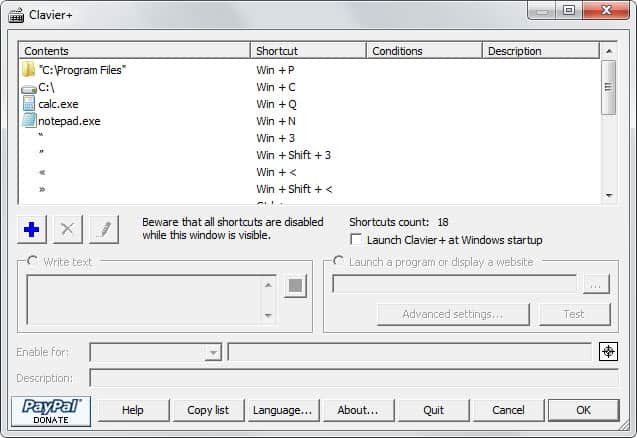
- Program: Select a program from your start menu that you want to open with the keyboard shortcut.
- Internet Favorite: Select a favorite that shall be loaded into the current browser with this shortcut. Favorites are imported from Internet Explorer only.
- Special Char: Display a special char with this shortcut.
- Open Folder: Use the keyboard shortcut to open the selected folder.
- Write Text: Write a text and create a shortcut out of it. You could for instance create a pc wide shortcut for your email address, a signature or even a letter.
- Launch a Program: This launches a program from the destination that you select. Many programs are not available in the start menu, that is why this option exists.
- Display a Website: This is similar to the Internet Favorite shortcut. The difference is that you specify the url by yourself with display a website.
Clavier has a built in autostart option which should be activated if you want to use it on a regular basis. It currently supports two languages: English and French. It is Open Source and does not have to be installed on the system if you download and unpack the version without installer from the authors website.
Tips
- Open the interface and select Language to change the default interface language.
- To start the program with Windows, check the box in the settings.
- You can modify any existing shortcut displayed in the program's interface by double-clicking on it. This opens the editor where you can assign a new shortcut or condition.
- Three conditions are available: Caps Lock, Num Lock and Scroll Lock state. This basically defines that a keyboard can only be executed on the system if one or multiple of the selected conditions are met.
















You might want to add Splat to your list:
http://skwire.dcmembers.com/fp/?
The author is a contributor to Donation Coder Forum.
Splat
Published by skwire on Wednesday, December 31, 2014
Title: Splat (Simple Program Launching and Termination)
Description: Splat is a program that allows you to build launch profiles that can include the following: 1) Launching applications, files, folders, URLs, etc., 2) The closing/killing of processes, and 3) Starting and stopping of services. You control the order and you can also insert two types of delays in between actions: 1) Time-based delays (wait n number of seconds before going on) and 2) CPU-usage delays (wait until the CPU usage gets below a certain percentage). Hotkey support is extensive; each launch profile can have its own hotkey or you can use one hotkey to launch multiple profiles. Profiles can be launched via the main interface, hotkeys, or the tray icon. Usage examples include:
Startup profile to control the timing and order of which apps you want to start after booting your computer.
Pre-gaming profile to close/kill/stop unwanted processes and services.
Post-gaming profile to open/start those same processes and services.
URL groups to launch sets of websites.
Development profile to start up your IDE, debugger, etc.
If you plan to use the service starting/stopping functionality, you must run this program with administrator rights.
This whole shebang is what one would call a minor sub-feature of “PowerPro” (http://powerpro.webeddie.com/). The cost here, to my memory, is roughly a 2MB download. Else, completely freee, too.