
Problematic Firefox Extensions

Firefox's extension engine is without doubt one of the most powerful features of the browser. Extension developers get lots of freedom when it comes to creating add-ons for the browser. Sometimes, extensions may cause issues or problems, memory leaks for example or instability. While that is usually not intended by the author of the extension, it still happens from time to time.
Mozilla is mainlining a list of problematic extensions that are know to cause issues or behave erratically in other ways. The website not only lists the extensions, but also possible workarounds.
The table on the website is divided into five columns listing extension names, the affected versions, a problem description, workaround and references. You may be surprised that you find popular extensions like FasterFox, Adblock, NoScript and Greasemonkey listed on this page.
If we take the popular Greasemonkey extension as an example. The problem reported is that Greasemonkey does not work on sites blocked by NoScript, another Firefox extension. The workaround suggests to set NoScript to allow JavaScript on sites you wish to use Greasemonkey scripts on. Take a look if you are experiencing troubles, this site may help you overcome them.
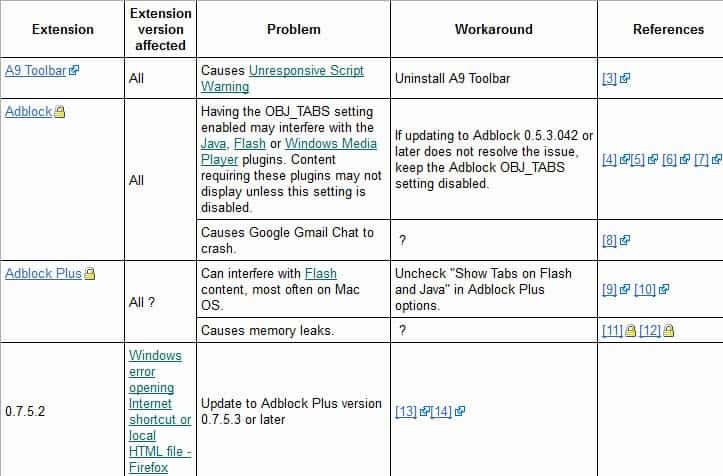
The listing seems to be updated fairly regularly with new add-on information once they become available. The latest entry according to the page's history dates back less than two weeks. While being updated regularly, it needs to be noted that you will still find extensions not listed on the page that may be problematic to you.
It is still a good idea to visit the page if you are experiencing issues with a Firefox add-on to see if it is a known problem, and if workarounds exist that can help you mitigate the issues that you experience. The last resort is to disable the extension in hope of it being updated by its author, or to uninstall it from the browser.
Update: The last update dates back to June 2012, almost a year ago (it is May 2013). While you may still find useful information listed here, it is likely that the page won't help you with issues that you may be experiencing recently. The best option that you have is use Mozilla's Support website to get help.
Advertisement

















