
Mozilla Firefox Cheat Sheet

The Mozilla Firefox Cheat Sheet offers shortcuts, tips, and information about the Firefox web browser on one single sheet of paper. While it is indeed most useful to new users of the Firefox web browser, it may provide even experienced Firefox users with information about shortcuts that they did not know about.
The Cheat Sheet has three major sections. Section one deals with Firefox shortcuts (general, navigation, text, search and mouse shortcuts). Section two lists the important locations like cache and profiles and section three lists some neat tips and tricks for blocking popups and customizing toolbars. You may even learn something new if you are working with Firefox on a daily basis, try it out.
Here are the top keyboard shortcuts that I use most often when I use the Firefox web browser:
- F5 Refresh page and cache
- Esc Stop
- Ctrl-T Create a new tab in the web browser
- F3 Open the find in page form that lets you search the open web page for the text that you enter
- Alt-Home Open the Firefox home page
- Ctrl-P Print the current web page on a connected printer
- Middle-click, or Shift-Click Open a link in a new tab in the web browser
- Ctrl-S Save the current web page on the local computer
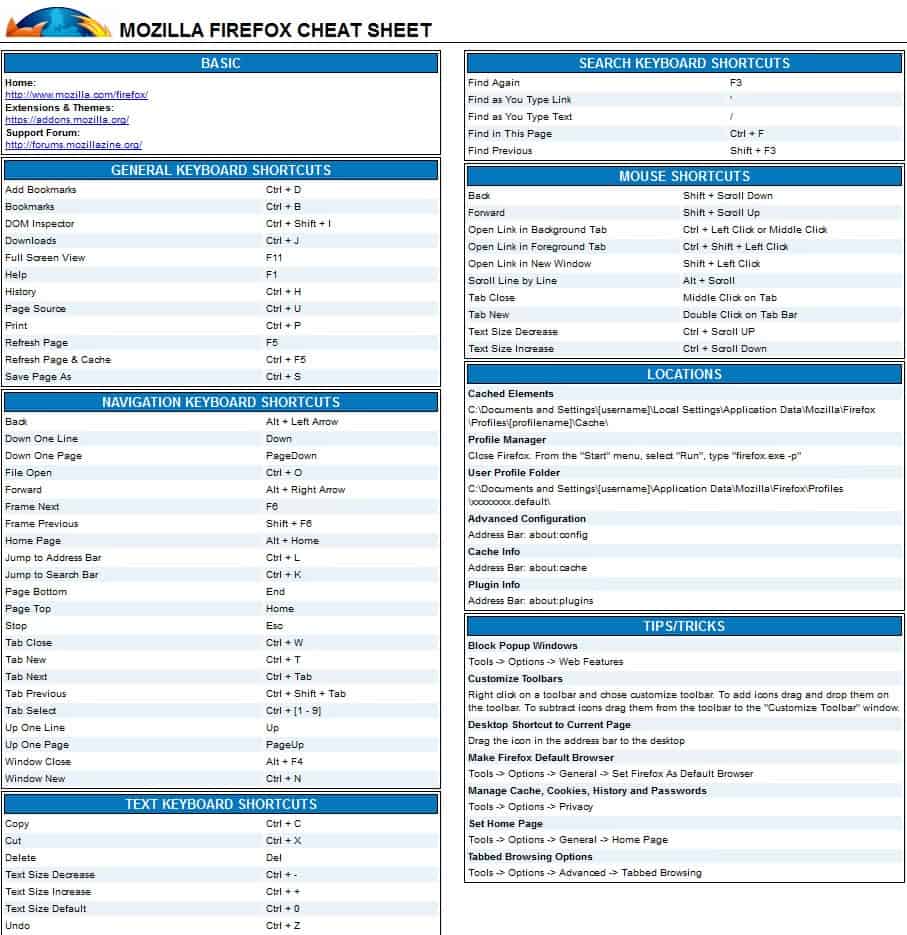
The Firefox cheat sheet is also available as a pdf document on the web page it has been posted on. It needs to be noted that it has not been updated since 2006 and that it lacks some of the newer keyboard shortcuts that Mozilla did introduce in later versions of the Firefox Internet browser. You will also notice that some information, like the user profile folder path or the menu tips, may not be correct depending on the operating system and version of the browser that you use.
I have created an updated version of the Cheat Sheet. It does not fit on one page anymore, sorry about that.
Search
- Find F3 or Ctrl-F
- Find Previous Shift-F3
- Quick Find (only links) '
- Quick Find (only text) /
Text Manipulation
- Copy Ctrl-C
- Cut Ctrl-X
- Paste Ctrl-V
- Paste as plain text Ctrl-Shift-V
- Delete Delete-key
- Undo Ctrl-Z
- Redo Ctrl-Y
- Select All Ctrl-A
- Increase text size Ctrl-+ or Ctrl-Mouse wheel up
- Decrease text size Ctrl-- or Ctrl-Mouse wheel down
- Set text size to default Ctrl-0
Navigation
- Back Alt-Left or Shift-Mouse wheel down
- Forward Alt-Right or Shift-Mouse wheel up
- Up one line UP or Alt-Mouse wheel up
- Down one line Down or Alt-Mouse wheel down
- Up one page PageUp
- Down one page PageDown
- Next Frame F6
- Previous Frame Shift-F6
- Select Tab 1 to 9 Ctrl-[1-9]
- New Tab Ctrl-N or Double-click on tabbar
- Close Tab Ctrl-W or Ctrl-F4 or Middle-click on tab
- Undo Close Tab Ctrl-Shift-T
- Next Tab Ctrl-Tab or Ctrl-PageDown
- Previous Tab Shift-Ctrl-Tab or Ctrl-PageUP
- Move Tab in focus left Ctrl-Shift-PageUp
- Move Tab in focus right Ctrl-Shift-PageDown
- Move tab in focus to start Ctrl-Home
- Move Tab in focus to end Ctrl-End
- Tab Groups View Ctrl-Shift-E
- Next Tab Group Ctrl- `
- Previous Tab Group Ctrl-Shift-`
- Close Tab Groups View Esc
- New Window Ctrl-N
- New Private Windows Ctrl-Shift-N
- Close Window Alt-F4 or Ctrl-Shift-W
- Undo Close Window Ctrl-Shift-N
- Open Link in new window Shift-Left click
- Open Link in foreground tab Ctrl-Shift-Left click
- Open Link in background tab Ctrl-Left click or middle-click
- Activate Address Bar Ctrl-L
- Complete .com address Ctrl-Enter
- Complete .net address Shift-Enter
- Complete .org address Ctrl-Shift-Enter
- Delete autocopy entries Select then Del
- Open Address in new tab Alt-Enter
- Activate Search Bar Ctrl-K or Ctrl-E
- Select search engine on search bar focus Alt-Up or Alt-Down
- Open Home Page Alt-Home
- Jump to top of page Home
- Jump to bottom of page End
- Stop loading Esc
- Reload page F5
- Reload page bypass cache Ctrl-F5
General
- Add bookmark Ctrl-D
- Bookmark all Tabs Ctrl-Shift-D
- Bookmarks Sidebar Ctrl-B
- Bookmarks Manager Ctrl-Shift-B
- Downloads Manager Ctrl-J
- History Manager Ctrl-H
- Page Info Ctrl-I
- Save Page Ctrl-S
- Print Page Ctrl-P
- Caret Browsing F7
- Full-Screen Mode F11
- Open-File Ctrl-O
- Open Add-ons Manager Ctrl-Shift-A
- Toggle Add-on Bar Ctrl-/
- Toggle Menu Bar Alt
- Clear Recent History Ctrl-Shift-Del
Web Developer
- Web Console Ctrl-Shift-K
- Inspector Ctrl-Shift-I
- Debugger Ctrl-Shift-S
- Style Editor Shift-F7
- Profiler Shift-F5
- Network Ctrl-Shift-Q
- Developer Toolbar Shift-F2
- Responsive Design View Ctrl-Shift-M
- Scratchpad Shift-F4
- Page Source Ctrl-U
- Error Console Ctrl-Shift-J
Media shortcuts (Ogg and WebM)
- Toggle Play / Pause Space
- Increase volume Up
- Decrease volume Down
- Mute audio Ctrl-Down
- Unmute audio Ctrl-Up
- Seek back 15 seconds Left
- Seek back 10% Ctrl-Left
- Seek forward 15 seconds Right
- Seek forward 10% Ctrl-Right
- Seek to the beginning Home
- Seek to the end End
Tips:
- about:support displays the Troubleshooting Information page, open the profile folder form here
- about:config displays Firefox's advanced configuration
- Run Firefox with the -profilemanager command to load the profile manager
Websites:
- Official Mozilla Homepage: http://www.mozilla.org/en-US/
- Official Mozilla Blog: https://blog.mozilla.org/
- Firefox Add-ons Store: https://addons.mozilla.org/en-US/firefox/
- Firefox Support: http://support.mozilla.org/en-US/home/
Note: OS X users need to use Command instead of CTRL and Option instead of ALT.



















It’s worth to mention that if you are using Firefox under Linux with KDE the CTRL+Tab is mapped to KDE desktop switcher and it overrides Firefox’s Next Tab and Previous Tab shortcuts.