
Guide to streamripping

Stream ripping refers to saving audio files, usually in mp3 format, from internet radio streams to your hard drive. All you need is the right tool that does the work for you and your favorite radio station that broadcasts on the internet and streams its audio in a format supported.
This article will provide you with the information you need to dive right into the stream ripping world to legally download mp3 audio files to your computer. I can't vouch for all countries though as far as legality is concerned and suggest you check your local laws first before you start using Streamripper or another program that lets you record Internet radio.
All you need is a version of the stream ripper program available at sourceforge.net. Select the version best suited for you, there are versions for pc, mac and unix as well as a winamp 5 plugin. The easiest way is probably simply to download the plugin for use in winamp 5. If you don't have winamp head over to winamp.com and download it now.
There is a good installation tutorial on the project site, if you have problems during installation go there, this should help you resolve those and get started.
After installing the plugin you are prompted to start winamp with the stream ripper plugin: select yes and you see the standard winamp screens and the additional stream ripper window. A stream ripper icon should appear in the taskbar next to your clock. Right-click it and select options, we should configure the program before we start using it.
The most important option is File / Output. You select a directory where the mp3 files should be saved in to. All others are optional, you can define under which name the song should be saved as, the default is Stream Artist - Title, you probably want to change that.
After saving the options we are ready to select a stream and start the ripping process. I suggest the following two websites for an excellent variety of streams that you can rip. The first is shoutcast.com which has more than 30 genres and thousands of radio stations. There should be stations for every taste.
The second one is the stream directory of xiph.org which also has a excellent selection and genres to select.
I suggest your streams should have at least 128 Kbit if you are on broadband, if you can spare it select stations with higher kbit but remember that the saved mp3 files will be larger this way and consume more bandwidth when they are transferred to your system.
My first selection is the number 1 stream on shoutcast, CLUB 977 The Hitz Channel (HIGH BANDWIDTH) station. Its important that winamp shows artist and title in its windows. This ensures that the stream sends this information and the files will be named correctly. If no information is send the files will get default names and you will have no clue about artist and title later.
When the stream starts in winamp stream ripper will automatically show a dialog "press start to rip "ip"". Just press start and stream ripper starts its service and saves the files to the location you specified. You can leave it on until you run out of hd space or have to shutdown the pc. If you want to stop simply select stop and the ripping process stops immediately.
That's all there is to know, enjoy this fine tool and watch your music collection grow legally.
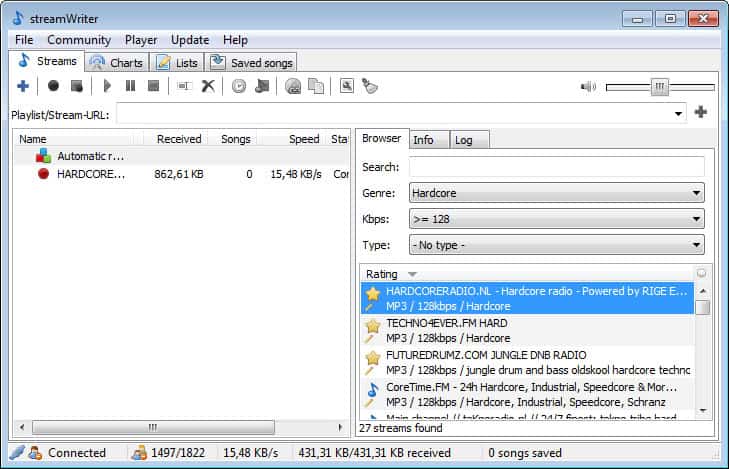
Update: Streamripper has not been updated since 2008. I recently discovered an alternative that you may want to try out first. StreamWriter comes with a large set of radio stations and can be used to record multiple stations at once. You are only limited by your computer's Internet connection and performance in regard to that.














Audacity does it well too. It records anysound thru the computer. Need a video version of this badly.
Great tutorial, cheers!
What about recording/editing songs from podcasts?
e.g. http://www.notyourusualbollocks.squarespace.com/ for instance… (using http://www.portableplaylist.com/ ).
If they stream them, sure.
this is pretty tight i can go to places at school when they have that web block thing
Hey this is cool…
you sure it’s legal in the USA?